Build a New-Construction Change Order Ledger Before AI Updates Buyers
AI can make new-construction buyer updates sound polished before the underlying construction record is ready. That is the risk. A buyer asks whether the upgraded cabinets are approved, whether the lighting allowance is still inside budget, whether the completion date moved, or whether the final walk-through issue changes closing expectations. The model can draft a confident answer in seconds, but confidence is not the same thing as a signed change order, a builder confirmation, a revised allowance sheet, or a current closing dependency.
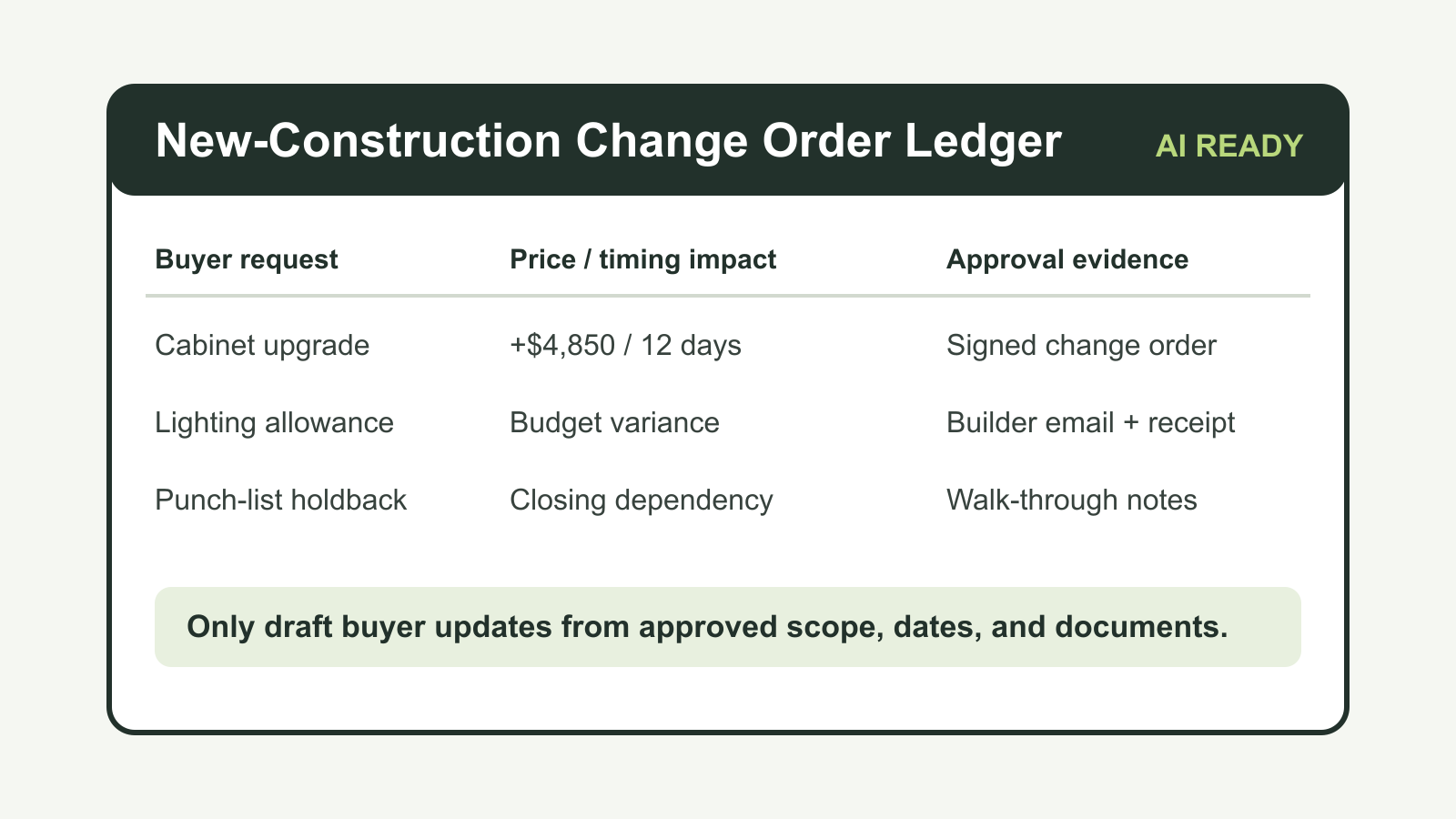
A new-construction change order ledger gives the team a controlled place to decide what AI is allowed to say. It is not another project-management board for the builder. It is the brokerage-side evidence layer that translates builder documents, buyer selections, emails, pricing requests, timeline changes, and walk-through notes into client-safe language.
The need is practical. NAHB describes residential construction contracts as agreements that explain scope of work, timing, payment requirements, communication frequency, and project changes. Its contract catalog includes plans and specifications, selection allowance worksheets, pricing request forms, change orders, final payment holdback language for punch-list completion, certificates of acceptance, and express limited warranty agreements. That structure is a useful reminder: in new construction, the client update is only as reliable as the latest approved scope, cost, timing, and remedy record.
At the same time, AI is already inside real estate workflows. NAR reported in September 2025 that 46% of REALTORS use AI-generated content, and a February 2026 RPR survey summarized by NAR found that 92% of surveyed agents are using AI or planning to use it. That same RPR survey said accuracy of outputs was the top concern at 63%, followed by compliance or legal issues at 49% and misinterpretation of market data at 47%. New-construction change orders sit directly inside those concerns because they combine cost, timing, contract scope, warranty expectations, and buyer emotions.
The ledger separates builder truth from buyer language
The ledger should be boring by design. Each row should answer seven questions before AI can use it:
- What buyer request or builder update triggered the issue?
- Which document controls the answer: contract, addendum, plans, specification sheet, allowance worksheet, pricing request, signed change order, builder email, lender note, inspection note, walk-through note, or warranty document?
- What changed in scope, cost, completion timing, financing assumptions, or warranty handling?
- Who has approved it, and in what form?
- What is still pending, disputed, or unknown?
- What client-facing wording is approved?
- What wording must be blocked because it sounds like legal, lending, construction, or warranty advice?
That structure keeps the AI assistant from blending similar facts. A buyer may have approved upgraded flooring but not the upgraded tile pattern. The builder may have priced a request but not accepted the change. The lender may need a revised contract price or updated closing numbers, but the brokerage should not imply lender approval. The walk-through may reveal an item that belongs in a punch list rather than a promise that closing will delay. The ledger makes those distinctions visible.
Treat pricing requests and approved changes differently
A common failure mode is letting AI summarize a price quote as if it were an accepted change. NAHB distinguishes pricing request forms from change-order forms in its contract materials. That distinction matters operationally. A pricing request can support a buyer conversation about an option under consideration. It should not become language that says the change is approved, installed, financed, or included in the final purchase price.
Use different ledger statuses for each stage:
- Requested: the buyer asked for a price, design change, material substitution, or schedule exception.
- Priced: the builder or vendor provided a price or allowance impact.
- Sent for approval: the team has sent the change to the buyer, builder, lender, or another required party.
- Approved: the correct party signed, acknowledged, or otherwise accepted the change in the required format.
- Superseded: a later document changed the cost, scope, timing, or material.
- Blocked: the team lacks required evidence or there is a dispute.
- Closed: the item is installed, documented, and no longer affects buyer communications.
AI prompts should only pull from approved or closed rows unless the prompt explicitly asks for internal follow-up language. Even then, the output should identify pending evidence, not answer the buyer as though the record is complete.
Capture timing impact separately from price impact
Buyers usually hear the cost first, but timing is often the bigger transaction risk. A change order that adds $2,500 may be manageable. A change that delays appraisal, final inspection, certificate of occupancy, loan conditions, walk-through, closing disclosure, or possession can create a different conversation.
The ledger should have separate fields for price impact and schedule impact. Do not bury timing inside notes. Record the original target date, revised target date, source of the revision, affected milestone, and confidence level. If the builder has not confirmed timing, the AI-approved wording should say the team is waiting on builder confirmation rather than inventing a date.
The CFPB reminds buyers to do a final walk-through and confirm agreed repairs or retained items before signing closing documents. It also tells consumers to review closing documents carefully and ask questions if documents do not match expectations. For new construction, the same discipline applies to changed scope and changed price. The buyer update should point to what has been confirmed and what remains open before closing, not smooth over uncertainty.
Link warranty expectations to the actual warranty document
FTC guidance on new-home warranties explains that builder warranties for newly built homes generally provide limited coverage for workmanship, materials, and specific components, and that coverage periods vary by component. It also notes that warranties spell out how repairs are made and that disputes can arise over whether a defect is covered or whether repair work was done properly.
That is why warranty language should not be generated from memory, a listing remark, or a sales conversation. The ledger needs a warranty section with the document version, effective date, covered categories, excluded items, claim process, emergency instructions, and escalation path. If a buyer asks whether a punch-list item will be covered after closing, AI should not answer broadly. It should draft a narrow response tied to the actual warranty record and route unresolved interpretation to the builder or attorney.
Build the prompt around evidence, not tone
Most teams start with prompts like "write a friendly update to the buyer." That is backwards. For new-construction issues, the prompt should begin with the ledger state:
- Approved scope: the specific selection, material, plan change, or repair item.
- Approved cost: the exact amount, allowance impact, credit, or no-cost status.
- Approved timing: the known milestone impact, if any.
- Pending evidence: what still needs confirmation.
- Blocked wording: claims the assistant cannot make.
- Recipient context: buyer, co-broker, lender, builder rep, closing team, or internal staff.
- Required next action: sign, confirm, wait, escalate, schedule, or document.
Then ask for the message. This converts AI from a source of truth into a drafting layer. NIST's AI Risk Management Framework is useful here because it frames AI risk management around governance, mapping, measurement, and management of system risks. In practical brokerage terms, the ledger is the map of the use case, the evidence fields are the measurement layer, the approval statuses are governance, and the blocked-wording rules are risk management.
A useful ledger schema
A working schema does not need to be complex. Start with these fields:
- Deal ID, property, buyer, builder, community, and plan/elevation.
- Request type: selection, allowance, structural, design, appliance, utility, landscape, punch list, warranty, closing condition, or financing-sensitive item.
- Source document and link.
- Source date and received date.
- Current status.
- Original scope and revised scope.
- Cost impact and who pays.
- Schedule impact and affected milestone.
- Lender or closing-team dependency.
- Builder contact and confirmation channel.
- Buyer approval evidence.
- Internal owner.
- Approved client summary.
- Blocked claims.
- Next action and due date.
- Last verified timestamp.
That last field matters. AI should not reuse a stale row just because the row exists. If a builder sends a revised delivery date, material substitution, or updated punch-list completion estimate, the old row should be marked superseded.
Where CRM automation fits
The ledger should connect to the CRM, but the CRM should not be the only system of record for construction facts. CRM notes are good for relationship history, reminders, task ownership, and message logs. The change order ledger should own controlled facts. Once a row is approved, the CRM can trigger the buyer update, assign a follow-up task, create a lender notification, or schedule a walk-through reminder.
This design also protects marketing automation. A buyer who is already anxious about construction delays does not need a generic nurture sequence that says "everything is on track" because the CRM did not know a change order was blocked. The ledger can suppress or change outbound messages when an active construction issue exists.
The operating rule
Do not let AI explain a new-construction change until the ledger can answer what changed, who approved it, what it costs, what it does to timing, what remains uncertain, and which document supports the answer.
That rule is slower than letting AI improvise. It is also the difference between useful automation and a client-facing mistake. The best AI system in a real estate operation is not the one that writes the most messages. It is the one that refuses to write past the evidence.

Written by
Ben Laube
AI Implementation Strategist & Real Estate Tech Expert
Ben Laube helps real estate professionals and businesses harness the power of AI to scale operations, increase productivity, and build intelligent systems. With deep expertise in AI implementation, automation, and real estate technology, Ben delivers practical strategies that drive measurable results.
View full profile