Build a Showing Readiness Board Before AI Books Buyer Tours
Build a Showing Readiness Board Before AI Books Buyer Tours
AI can already read buyer notes, watch new listings, propose tour windows, and draft the scheduling text. That is useful only when the business has a reliable answer to a more basic question: is this buyer, this property, and this message ready for an automated showing workflow?
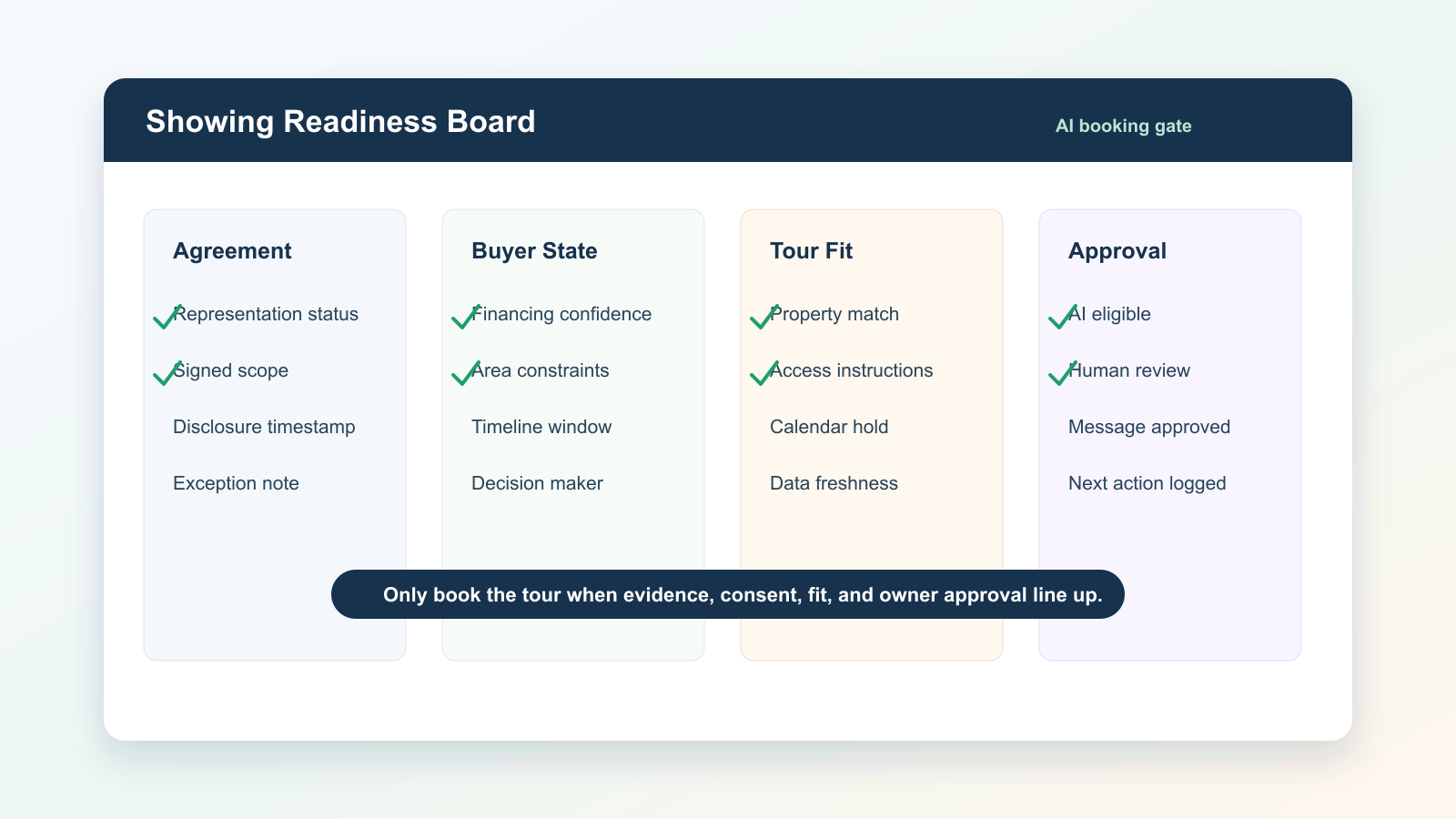
A showing readiness board is the control layer between a buyer CRM and an AI scheduler. It is not a prettier calendar. It is a small operational record that proves the team has the required agreement status, buyer context, property fit, access instructions, and human approval before an AI tool suggests a tour, sends a text, or assigns a showing task.
That distinction matters because buyer tours now carry more operational weight than they did a few years ago. NAR guidance says written buyer agreements became required before touring a home as part of the post-settlement practice changes that took effect in 2024. At the same time, the 2025 NAR Profile of Home Buyers and Sellers shows buyers still depend heavily on agents to find the right home, negotiate, and manage the process. When teams add AI scheduling on top of that trust, the risk is not that the calendar invite is wrong. The risk is that the AI advances a buyer relationship before the underlying evidence is complete.
The board prevents that by forcing four gates before automation touches the buyer.
Gate 1: representation and agreement status
The first column should answer one question with no ambiguity: can this team invite the buyer to tour this property under the current representation and agreement record?
At minimum, track the agreement status, effective date, expiration date, geographic or property-type scope, compensation disclosure status, and the staff member who reviewed it. Do not let the AI infer this from a note like "buyer wants to see homes this weekend." A buyer note describes intent. It does not prove authority to act.
This is where many CRM-driven teams create accidental risk. They have the signed document in one folder, the buyer preference note in another system, and the showing request in a third tool. The AI sees the note and the listing but not the binding operational state. A readiness board closes that gap by creating a single field that says "tour eligible," "needs agreement," "needs broker review," or "do not schedule." The scheduler should read that field, not guess from scattered activity.
Gate 2: buyer state
The second column should describe whether the buyer is ready for the specific showing, not whether the buyer exists in the database.
Track financing confidence, budget band, desired areas, timing, decision makers, accessibility needs, communication preference, and last-confirmed timestamp. The timestamp is important. A buyer who was ready 45 days ago may now have a rate-lock issue, a school-zone constraint, or a spouse who has not seen the neighborhood. AI scheduling works best when stale context is treated as a blocker instead of background color.
Use simple states: current, needs refresh, conflicted, and manual only. Current means a human or verified workflow has confirmed the buyer facts recently enough for scheduling. Needs refresh means the AI may draft a confirmation request but cannot book the showing. Conflicted means two data points disagree, such as the CRM saying the buyer wants one city while the latest message asks about another. Manual only means the relationship needs a person before automation resumes.
Gate 3: property and tour fit
The third column should prove the property deserves the buyer's time.
This is where AI can be genuinely helpful. It can compare property facts against buyer preferences, summarize listing remarks, detect mismatches, and propose a reason to tour. But the board should separate "AI found a match" from "team approved the match." Required fields should include property address or MLS identifier, fit reason, mismatch warning, showing availability, access instructions, travel time or route constraint, and any known listing-agent restrictions.
The strongest version of this board includes a mismatch note. For example: "matches area and price, but second-floor bedrooms conflict with accessibility preference." That note keeps the AI from writing a confident message that hides the tradeoff. It also gives the agent a better human conversation: here is why the home may still be worth seeing, and here is the known concern.
Gate 4: approved next action
The final column decides what automation is allowed to do.
Do not give every buyer-record/property-match pair the same permission. The next action should be explicit: draft only, send confirmation, propose three tour windows, assign agent review, create manual call task, or block. The action should include an owner, an expiration time, and a reason code.
The expiration time is the part teams skip. Showing availability, buyer calendars, and listing status change quickly. If the AI is allowed to act on yesterday's approval, it will eventually send a polished message about an unavailable home. A 24-hour or 48-hour expiration forces the workflow to re-check the facts before the buyer hears from the system.
What this looks like in the CRM
Keep the board boring. A complex interface becomes another system agents ignore.
Use one record per buyer-property-tour opportunity with these fields:
- Buyer ID and property ID
- Agreement status: eligible, needs agreement, review, blocked
- Buyer state: current, refresh, conflicted, manual only
- Property fit: strong, conditional, weak, do not recommend
- Showing access: available, limited, unavailable, unknown
- Approved AI action: none, draft, confirm, book, assign human
- Approval owner and approval timestamp
- Expiration timestamp
- Evidence links: agreement, buyer confirmation, listing source, showing instructions
- Exception note
The AI should be allowed to read the board and write back only to controlled fields: proposed summary, proposed message, mismatch warning, and suggested next action. It should not rewrite agreement status, erase exception notes, or convert a manual-only buyer into an automation-eligible buyer.
Why the board should exist before the AI agent
Recent NAR and RPR research shows real estate professionals are experimenting with AI, but trust still depends on accuracy, context, and human oversight. The same pattern appears in practical operations: agents are open to faster drafting and routing, but they do not want an AI tool creating avoidable compliance or client-experience problems.
The showing readiness board gives the AI a narrow job. Instead of asking it to be the agent, the compliance reviewer, the transaction coordinator, and the scheduler at the same time, the business asks it to operate inside a visible gate. That is the difference between automation that feels fast and automation that can actually scale.
It also creates a useful audit trail. If a buyer asks why a property was recommended, the team can point to the match reason and the known tradeoffs. If a showing was not scheduled, the team can see whether the blocker was agreement status, stale buyer data, access instructions, or human review. That makes coaching easier and makes CRM cleanup concrete.
The implementation rule
Do not start with a fully autonomous showing agent. Start with a board that an agent would trust if the AI disappeared tomorrow.
For the first two weeks, let AI only draft the tour recommendation and mark missing fields. Require a human to approve every send or booking. After the board produces clean evidence, allow the AI to send confirmation requests for records where agreement status is eligible, buyer state is current, property fit is strong or conditional, showing access is available, and approval has not expired.
That staged rollout keeps the team from confusing automation speed with operational readiness. The goal is not to have AI book more tours. The goal is to make sure every AI-assisted tour has the agreement, buyer context, property fit, and approval needed to protect the relationship.
A CRM that can answer those questions clearly is ready for AI scheduling. A CRM that cannot answer them is only ready for a cleanup project.

Written by
Ben Laube
AI Implementation Strategist & Real Estate Tech Expert
Ben Laube helps real estate professionals and businesses harness the power of AI to scale operations, increase productivity, and build intelligent systems. With deep expertise in AI implementation, automation, and real estate technology, Ben delivers practical strategies that drive measurable results.
View full profile